
30+ minutes
Laptop-based process replaced
5-10 minutes
New mobile entry time on site
3 field team
Beta tested, confirmed faster & easier use
MY ROLE
Product Designer
PLATFORM
iOS & Android
Web platform
TEAM
1 Product Owner
2 Developer
1 Product Designer (me)
TIMELINE
3 months
2025
RESPONSIBILITIES
IA refinement · UX design · Beta testing · Onboarding
TOOLS
Figma · Miro · Confluence
CONTEXT
What is a Construction Diary and why does it matter?
Construction workers on solar project sites (electricians, solar fitters, team leads, and site managers) are legally required to log their daily work activities, team members present, weather conditions, and any incidents. This is called a Bautagesbuch — a standard construction documentation requirement. The records feed controlling, legal, and client reporting.
I joined an existing project where the initial problem, user flow, and early UI designs had already been defined by an external team. My responsibility was to deepen that foundation: conducting expert walkthroughs, gathering user and stakeholder feedback, and refining the information architecture before the beta phase.
01 DISCOVERY
The existing solution created more work than it saved
Workers were using Asana, a project management platform, to log their construction diary. The flow required navigating to a laptop, finding the correct project, and completing a generic online form. That form was shared across all teams on AC and DC electrical systems, forcing workers to wade through the same inventory fields regardless of their actual role.
Workers were spending 30+ minutes entering information that often didn't reflect their actual situation on site.
I conducted expert walkthroughs of the existing user flow and gathered feedback from users, stakeholders, project managers, and the legal team to identify friction points and gaps in the concept.
KEY FINDINGS FROM REVIEW & FEEDEBACK
-
Too many steps to reach core function → multiple screens before logging began
-
Excessive mandatory fields → many required fields were irrelevant to specific teams, creating friction and slowing entry
-
Critical tasks buried under secondary ones → urgent incidents had to scroll past non-urgent fields
-
Poor information grouping → related data scattered across the form; hard to scan
-
No ability to save progress → interruptions on site meant lost work
-
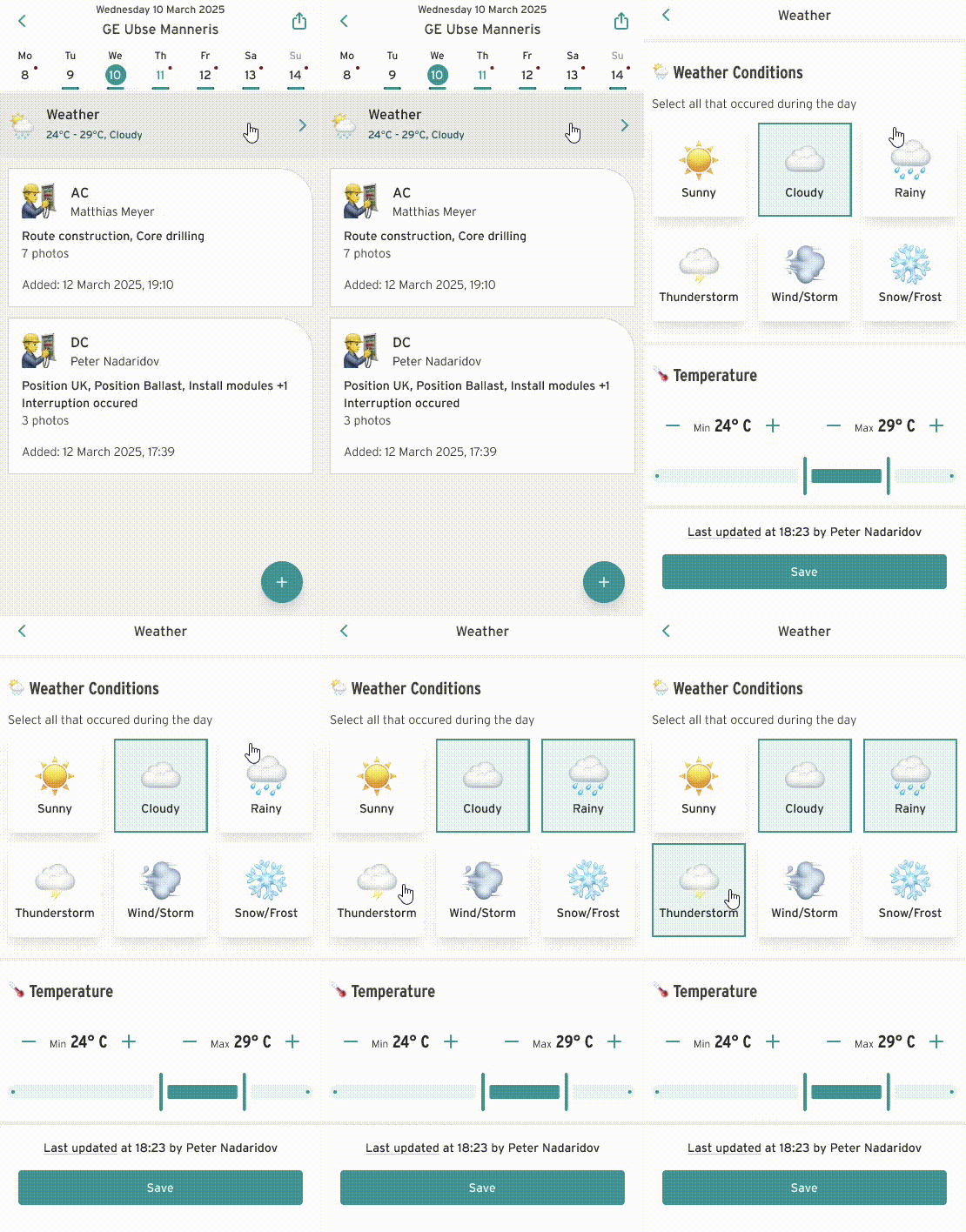
Weather data inconsistency → each log entry required its own weather field; conflicting entries arose within one day
-
No photo export control → the export function gave users no control over which photos were included
-
No centralised overview for stakeholders → project managers, engineers, and planners had no single place to review entries across all teams
02 DEFINITION
The form was designed around data collection, not around people doing work under pressure
Workers were using Asana, a project management platform, to log their construction diary. The flow required navigating to a laptop, finding the correct project, and completing a generic online form. That form was shared across all teams on AC and DC electrical systems, forcing workers to wade through the same inventory fields regardless of their actual role.
User Groups:
AC electricians · DC solar fitters · Site managers · Project managers · Engineers
03 DESIGN
Decisions that shaped the product
I redesigned the flow working backwards from the minimum inputs genuinely required per entry type and role. Below are three specific design decisions — each one a direct response to a problem found in discovery
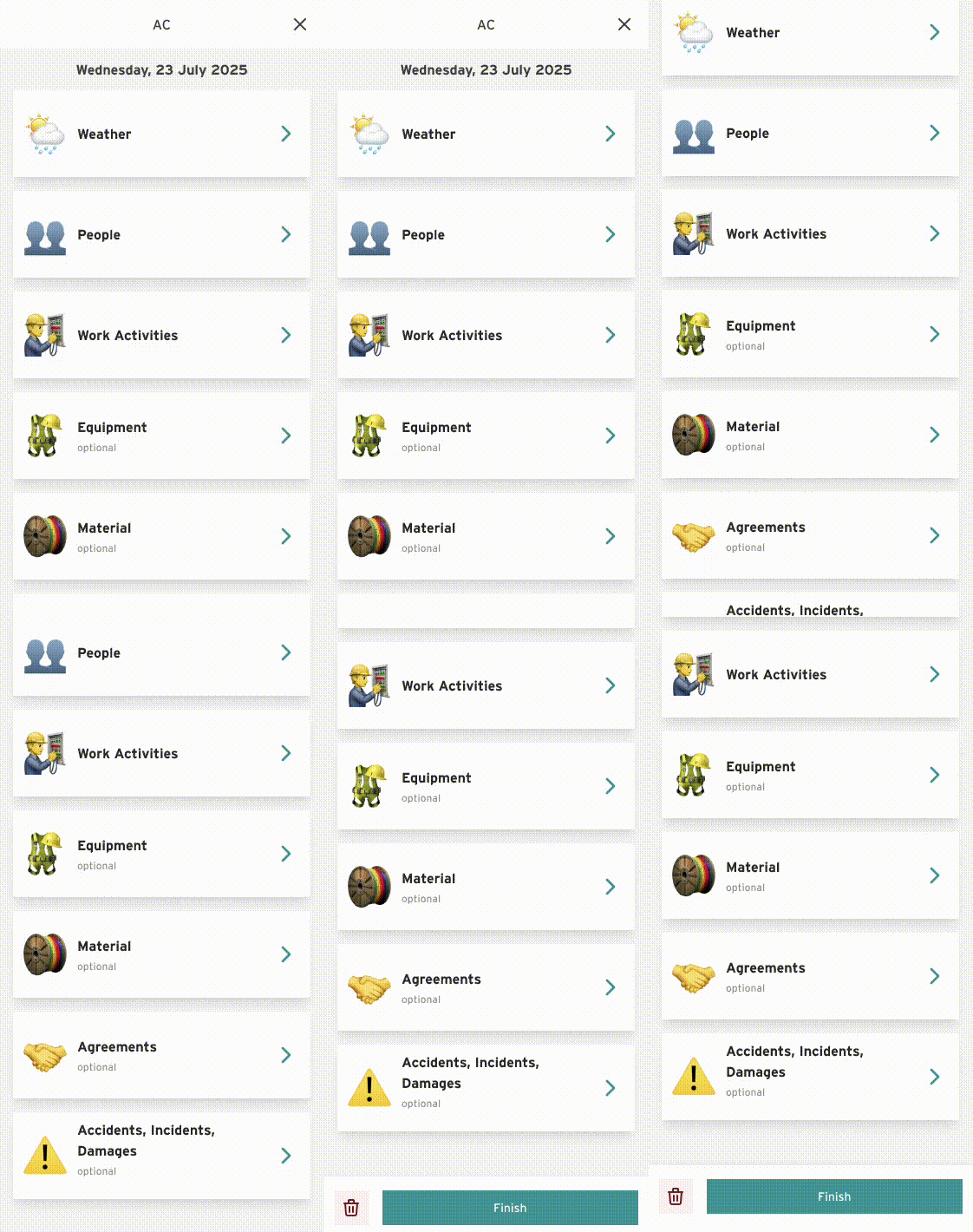
Log the incident first.
Capture secondary data after.
%20small%20height.png)
The original flow required workers to complete mandatory weather fields and record persons present before they could document an actual incident. I proposed reversing the priority: log the incident immediately, then complete secondary data such as materials and equipment afterwards. This reduced friction without compromising record completeness.
%20weather%20small%20height.png)
%20-_%20Export%20Sheet%20-_%20Date%20Picker.png)
.png)

04 DELIVERY
The redesigned construction diary
The solution embeds a mobile-first experience into the existing app. No laptop or Asana login required. Forms display only the fields relevant to each team's role, with urgent tasks and incident reporting prioritised at the top. Draft saving lets workers complete entries across multiple sessions without losing progress.


Once the MVP was complete, I onboarded three project teams including project managers, electricians, engineers, site managers, and solar fitter teams for the beta phase. Follow-up interviews were then conducted to gather structured feedback.
OUTLOOK
Beta teams confirmed: faster, easier, and used in the field from day one
All three testing teams confirmed the app was significantly faster and easier to use than the previous solution.
Construction team reported replacing 30+ minute laptop based-process with 5-10 minutes of mobile entry directly on site.
Three findings that go beyond usability
Follow-up interviews surfaced gaps between the model we designed around and how work actually happens on site. Each finding reveals an assumption the design made, and what a next iteration could address.
Delivery documents aren't always accessible on site
Teams reported that delivery documents are often PDFs received by email, not held in any structured system. Workers are navigating ad-hoc inbox files at the point of logging.
Next iteration: Allow email-linked attachments, or treat "no document available" as a valid and common state.
Equipment & materials can't be meaningfully quantified
Workers said they would not attempt to count small items, and the effort is out of proportion to the value of the data. Teams indicated they would skip the field entirely rather than enter an estimate.
Next iteration: Distinguish trackable from non-trackable item types, or add a clear "not applicable" path to prevent field abandonment.
Team leads need a space for open to-dos, for shift handovers
Team leads asked for a free-text field to note what needs to happen next, particularly when a different worker takes over the following day. The diary is being used as a handover tool, not just a documentation log, a use case the original design didn't anticipate.
Next iteration: A "notes for next shift" field would provide high value, low complexity, and directly requested by field teams.